Desktop barebones systems offer a foundational computing platform, typically compact, without pre-installed RAM, storage, or an operating system. They are ideal for users seeking customizability for home theater PCs, office workstations, or specialized embedded applications. Products were evaluated based on processor capability, memory and storage expandability, connectivity options, user reviews, and feature analysis.

MINISFORUM AMD Ryzen 9 9955HX Barebone with MS-A2 Mini PC (16C/32T, up to 5.4GHz),PCIe×16, HDMI/2x USB-C (8K@60Hz), 2X SFP+ 10G, 2X 2.5G LAN, 3X SSD M.2 (2280/22110/U.2),NO RAM/SSD/OS
$799.00
This barebone offers a powerful AMD Ryzen 9 processor, extensive storage options, and advanced cooling, making it suitable for demanding tasks.
View on Amazon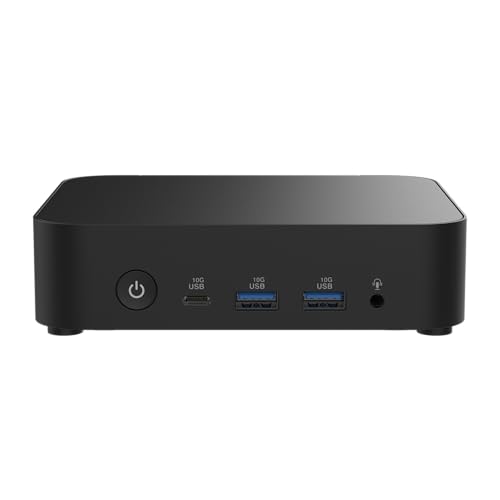
ASUS NUC 14 Essential Barebone Kit Mini PC with Intel Processor N150, Single DDR5-4800 RAM Slot, Single Storage Design, Triple Display Support, 2.5G LAN, Wi-Fi 6E & Bluetooth 5.3, VESA Mount Included
The ASUS NUC 14 Essential provides an energy-efficient Intel Processor N150, making it an economical choice for basic productivity and embedded use.
View on Amazon
ASUS NUC 14 Pro Tall Barebone with Intel 14th Gen Core 3 100U, Up to 96GB DDR5 RAM, Triple Storage Design, Thunderbolt™ 4, Wi-Fi 6E & Bluetooth 5.3, Toolless Chassis Access, with VESA Mount Included
$381.17
Equipped with the latest 14th Gen Intel Core 3, substantial DDR5 RAM support, triple storage, and Thunderbolt 4, it delivers high-end performance and connectivity.
View on Amazon
- Supports AMD AM4 Socket Ryzen 2000, 3000, 4000 G-Series, 5000 and 5000 G-Series Desktop Processors, up to 65W
- Supports MAX Height ≦ 54mm CPU Cooler
- Supports 4 x DDR4-3200MHz DIMMs, up to 128GB
- 1 x PCIe 3.0 x16 2 x SATA3, 1 x Ultra M.2 (PCIe Gen3 x4)

- Compact 8-Liter Form Factor: A versatile barebone kit that offers significant space savings (8L) while supporting full-size desktop components for powerful, customizable builds.
- Intel LGA1700 Platform Support: Designed for 14th, 13th & 12th Gen Intel Core processors, providing a modern foundation for gaming, productivity, and home theater PCs.
- Discrete Graphics Ready: Features a PCIe 4.0 x16 slot that supports a dual-slot graphics card up to 20cm in length, allowing for capable gaming and creative work.
- High-Capacity DDR4 Memory: Four DDR4 DIMM slots support up to 128GB of memory at speeds up to 3200MHz, offering excellent bandwidth for multitasking.

- Ultra-Compact 1.92L Form Factor: A complete barebone kit for building an incredibly space-saving desktop PC, measuring just 1.92 liters in volume.
- Versatile AMD AM4 Platform: Designed to support a wide range of AMD Socket AM4 Ryzen 5000/4000/3000/2000 Series processors (up to 65W), offering flexible performance options.
- High-Capacity DDR4 Memory: Features two DDR4 SO-DIMM slots supporting up to 128GB of memory at speeds up to 3200MHz (with compatible Ryzen processors).
- Triple Display Capability: Supports up to three simultaneous displays via 1x HDMI (4K@60Hz), 1x DisplayPort, and 1x D-Sub (VGA) for versatile multi-monitor setups.

- Powerful Ryzen 9 9955HX: The MS-A2 mini PC is equipped with an AMD Ryzen 9 9955HX processor (16 cores/32 threads, Zen5 architecture, 64 MB L3 cache, up to 5.4 GHz), which offers excellent multi-threaded performance and smooth HD graphics processing...
- Fast memory & expandable storage:Supports DDR5 SODIMM, supporting 5600 MT/s, up to 96 GB and three M.2 NVMe SSD slots. Supports M.2 2280/22110/U.2 NVMe, U.2 HDD up to 15 TB, maximum thickness of 7 mm (max total capacity up to 23 TB). PCIe 4.0 speeds up to...
- Efficient Cooling: Equipped with three pure copper heat pipes, phase-change thermal materials, and turbo-accelerated fans, increasing airflow by 30%. The direct exhaust, reactor-type design effectively controls temperature and ensures continuous...
- PCIe x16 Slots: Enables expansion with high-performance network cards or professional graphics cards. Supports splitting into two PCIe x4 slots, expanding half-height professional graphics cards, or dual 10G network cards, suitable for AI inference and...

- AI-Accelerated Hybrid Performance: Unleash next-gen AI workloads with up to Intel Core Ultra 9, 12 Xe GPU cores, and NPU 5. Hybrid XPU architecture delivers up to 180 Platform TOPS, optimized for real-time Edge AI inference and machine learning tasks.
- Hyper-Connected Workspace: Intel Wi-Fi 7 and Bluetooth 6.0 enable low-latency wireless. Dual 2.5G LAN ensures network redundancy, Zero Trust security, and high throughput for enterprise and Edge AI workloads.
- Enterprise Security & Management: Supports Intel vPro (select SKUs) and fTPM for hardware-based security. ASUS Control Center & Edge Suite enable centralized management, remote monitoring, and asset reporting.
- Optimized Form Factor & Expansion: Compact 5x4 form factor (144 x117x42mm) with Tool-less Chassis 2.0 allows upgrades to dual M.2 SSDs (Gen5/Gen4). Maximizes thermal headroom while maintaining flexibility and performance.

- AI-Accelerated Hybrid Performance: Unleash next-gen AI workloads with up to Intel Core Ultra 9, 12 Xe GPU cores, and NPU 5. Hybrid XPU architecture delivers up to 180 Platform TOPS, optimized for real-time Edge AI inference and machine learning tasks.
- Hyper-Connected Workspace: Intel Wi-Fi 7 and Bluetooth 6.0 enable low-latency wireless. Dual 2.5G LAN ensures network redundancy, Zero Trust security, and high throughput for enterprise and Edge AI workloads.
- Enterprise Security & Management: Supports Intel vPro (select SKUs) and fTPM for hardware-based security. ASUS Control Center & Edge Suite enable centralized management, remote monitoring, and asset reporting.
- Optimized Form Factor & Expansion: Compact 5x4 form factor (144 x117x42mm) with Tool-less Chassis 2.0 allows upgrades to dual M.2 SSDs (Gen5/Gen4). Maximizes thermal headroom while maintaining flexibility and performance.

- 【Ryzen 7 8745H Performance】The UM870 Slim Mini PC comes with AMD Ryzen 7 8745H(8C/16T up to 4.9Ghz) processor. The faster performance can handle heavy computing tasks smoothly and better for multitasking. It widely used for light games, image editing...
- 【Strong Graphics】The UM870 Slim Micro Computer equipped with AMD Radeon 780M Graphics which built on the new generation of RDNA 3 architecture AMD graphics , it is designed for the next generation of efficient high-performance gaming and brings...
- 【8K Display Output】This Personal Mini PC equipped with three video output, 8K@60Hz display output via HDMI 2.1 and USB4 Port, 4K@60Hz display via DisplayPort, you could connect three independent displays, which ensures smooth navigation, responsive...
- 【Stable Network Transmission】UM870 Slim mini desktop computer with 2.5G RJ45 ethernet port, outputting stable and strong network signal, with WiFi6E and BT5.3, it can significantly reduce the host's CPU load. Improve network performance and reduce...

- System Compatibility: Mini-STX (155x155x80mm) barebone; requires LGA1151 CPU, DDR4 SO-DIMM memory, M.2 SSD/2.5" drive, and OS
- Dedicated Support: Contact us through Amazon for any product questions or assistance
- Supports Intel 9th/8th Gen LGA1151 CPUs: Compatible with Intel Core, Pentium, and Celeron processors; supports standard Intel box fans
- Dual DDR4 SO-DIMM Slots: Two SO-DIMM slots support up to 64GB of DDR4 memory for responsive multitasking

- Powerful processor: MINISFORUM M1 Pro-125H is equipped with Intel Core Ultra 5 125H processor (14 cores and 18 threads, up to 4.5GHz) and integrated Intel Arc graphics, providing excellent multi-threaded computing and smooth HD graphics processing...
- High-speed memory and expandable storage: Supports DDR5 SODIMM, up to 5600 MT/s, and supports up to 96 GB; and equipped with dual M.2 2280 PCIe 4.0 slots (each slot supports up to 4TB capacity). RAID 0 can increase speed; RAID 1 can protect your data...
- Immersive gaming experience: 65W powerful output and OCuLink GPU expansion support allow you to experience AAA games to the extreme. Built-in sound card and dual speakers, 4K output, intelligent noise reduction, and ultra-fast DDR5/SSD work together to...
- Quad 4K display output: Support up to quad displays through HDMI 2.1 (4K@60Hz), DP 1.4 (up to 8K@60Hz or 4K@144Hz), and dual USB4 ports (up to 8K@60Hz) to create an efficient multi-display configuration. USB4 supports 15W output and 65-100W input, of...
This article is part of our complete guide Laptops & Desktops — browse all our comparisons and buying guides.
Last update on 2026-10-16 / Affiliate links / Images from Amazon Product Advertising API
How to Choose the Best Desktop Barebones
Processor Platform and Performance
When selecting a desktop barebone, the choice between Intel and AMD processors significantly impacts performance and potential use cases. For instance, the ASUS NUC 14 Pro Tall features a 14th Gen Intel Core 3 100U, which typically offers strong single-core performance and integrated graphics suitable for general productivity and media consumption. In contrast, the MINISFORUM AMD Ryzen 9 9955HX barebone, with its 16 cores and 32 threads, delivers superior multi-threaded performance, making it a more robust option for intensive tasks like video editing, virtualization, or even light gaming. Users often find that for energy-efficient office tasks, an Intel N150 processor, as seen in the ASUS NUC 14 Essential, provides ample power while minimizing consumption. Compatibility is also key; the ASRock DESKMINI 310W explicitly warns against backward compatibility with older LGA 1151 CPUs, emphasizing the need to match the processor generation.
Memory and Storage Expandability
The flexibility to configure RAM and storage is a core advantage of barebones systems. Modern barebones, such as the ASUS NUC 14 Pro Tall and the MINISFORUM AMD Ryzen 9 9955HX, support DDR5 SODIMM memory, with capacities reaching up to 96GB. This higher capacity and faster clock speed (e.g., DDR5-5600MHz) are crucial for multitasking and running memory-intensive applications. Storage options also vary widely; some barebones, like the MINISFORUM unit, offer three M.2 NVMe SSD slots, providing extensive high-speed storage potential. Others, such as the ASUS NUC 14 Pro Tall, boast a triple storage design, typically accommodating a mix of M.2 and SATA drives for balanced speed and capacity. More budget-focused options like the ASUS NUC 14 Essential might feature a single storage design, which limits expansion but simplifies setup.
Connectivity and I/O Ports
Connectivity is paramount for integrating a barebone into an existing setup. Advanced barebones like the ASUS NUC 14 Pro Tall include Thunderboltâ„¢ 4, which offers versatile high-speed data transfer, video output, and power delivery over a single port. For network-intensive applications, the MINISFORUM barebone stands out with two SFP+ 10G ports and two 2.5G LAN ports, providing exceptional network throughput not commonly found in mini PCs. Standard connectivity often includes Wi-Fi 6E and Bluetooth 5.3, as seen in both ASUS NUC models, ensuring fast wireless networking and peripheral connections. Display outputs also vary; some units like the MINISFORUM offer multiple HDMI/USB-C outputs supporting 8K@60Hz, crucial for multi-monitor setups or high-resolution displays.
Chassis Design and Cooling Solutions
The physical design and thermal management of a barebone directly impact its longevity and sustained performance. Many barebones, including the ASUS NUC 14 Pro Tall, feature toolless chassis access, which simplifies upgrades and maintenance. The compact nature of ASRock's DESKMINI series makes them suitable for space-constrained environments. Effective cooling is particularly important for high-performance barebones; the MINISFORUM unit, for example, is equipped with three pure copper heat pipes and phase-change thermal materials, designed to manage the heat from its powerful Ryzen 9 processor effectively. For less demanding applications, like those targeted by the ASUS NUC 14 Essential, simpler cooling solutions suffice due to their lower power consumption and heat generation.
Pros & Cons
ASUS NUC 14 Pro Tall Barebone with Intel 14th Gen Core 3 100U, Up to 96GB DDR5 RAM, Triple Storage Design, Thunderbolt™ 4, Wi-Fi 6E & Bluetooth 5.3, Toolless Chassis Access, with VESA Mount Included
Pros
- Features the latest 14th Gen Intel Core 3 100U processor for modern performance.
- Supports up to 96GB DDR5-5600MHz RAM and a triple storage design for extensive expandability.
- Includes Thunderbolt™ 4, Wi-Fi 6E, and Bluetooth 5.3 for cutting-edge connectivity.
Cons
- The Core 3 processor might not suffice for very demanding, multi-threaded applications.
- As a newer model, long-term user feedback on stability and performance under sustained load is still emerging.
MINISFORUM AMD Ryzen 9 9955HX Barebone with MS-A2 Mini PC (16C/32T, up to 5.4GHz),PCIe×16, HDMI/2x USB-C (8K@60Hz), 2X SFP+ 10G, 2X 2.5G LAN, 3X SSD M.2 (2280/22110/U.2),NO RAM/SSD/OS
Pros
- Equipped with a powerful AMD Ryzen 9 9955HX processor (16C/32T) for high-end computing.
- Offers extensive storage with three M.2 NVMe SSD slots, including support for 22110 and U.2 drives.
- Advanced cooling system with three pure copper heat pipes and phase-change thermal materials for sustained performance.
Cons
- The high-performance components may generate more heat and require more robust cooling than simpler barebones.
- Requires users to source their own RAM, SSDs, and OS, adding to the initial setup effort and cost.
ASUS NUC 14 Essential Barebone Kit Mini PC with Intel Processor N150, Single DDR5-4800 RAM Slot, Single Storage Design, Triple Display Support, 2.5G LAN, Wi-Fi 6E & Bluetooth 5.3, VESA Mount Included
Pros
- Highly energy-efficient with an Intel Processor N150, ideal for lightweight office and embedded uses.
- Features an easy-access design, simplifying upgrades and reducing maintenance downtime.
- Includes 2.5G LAN, Wi-Fi 6E, and Bluetooth 5.3 for reliable modern connectivity.
Cons
- Limited to a single DDR5-4800 RAM slot and single storage design, restricting expandability.
- The Intel Processor N150 is less powerful, making it unsuitable for demanding applications or heavy multitasking.
Common Mistakes to Avoid
Ignoring CPU Socket and Generation Compatibility
A frequent error users make is assuming CPU compatibility based solely on the socket type. For example, the ASRock DESKMINI 310W explicitly states it supports Intel 8th processors (socket 1151) but is not backward compatible with older generation LGA 1151 CPUs. Attempting to install an older 6th or 7th Gen Intel processor in this barebone will result in an incompatible system, despite the physical socket appearing identical. Always verify the specific CPU generation supported by the barebone's chipset.
Underestimating RAM and Storage Needs
Users often select a barebone without fully considering their future memory and storage requirements. A barebone like the ASUS NUC 14 Essential, with its single DDR5-4800 RAM slot and single storage design, is excellent for basic tasks but quickly becomes a bottleneck for users needing more than 16GB or multiple drives. Conversely, choosing a MINISFORUM AMD Ryzen 9 9955HX barebone with three M.2 NVMe SSD slots might be overkill if only a single drive is ever planned. Evaluate the maximum supported RAM (e.g., 32GB for ASRock DESKMINI 310W versus 96GB for ASUS NUC 14 Pro Tall) and the number/type of storage bays.
Overlooking Essential I/O and Network Connectivity
Another common oversight is neglecting the specific I/O ports and network capabilities required for a particular application. For instance, if you require high-speed external storage or multiple 8K displays, a barebone with Thunderboltâ„¢ 4, like the ASUS NUC 14 Pro Tall, or multiple 8K-capable USB-C/HDMI ports, as found on the MINISFORUM MS-A2, is critical. Relying on basic USB 2.0 ports for demanding peripherals or a single 1G LAN port for a high-traffic server application, when a barebone like the MINISFORUM offers 2X SFP+ 10G and 2X 2.5G LAN, can severely limit performance and functionality in practice.