Computer Accessories

The Best External Hard Drives

This post contains affiliate links. As an Amazon Associate we earn from qualifying purchases. Our picks are based on Amazon bestseller rankings, Amazon customer ratings, and product availability. We update our recommendations regularly to ensure accuracy.

External hard drives offer crucial solutions for data backup, storage expansion, and secure file transfer. With various technologies, capacities, and features available, selecting the right drive ensures your digital life is protected and accessible. Understanding key specifications will help you make an informed decision.

No. 1
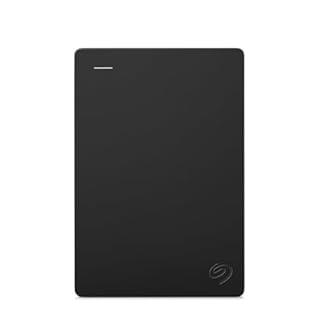
Seagate 2TB Portable Hard Drive | USB 3.0 (STGX2000400) | Everyday HDD storage. Plug-and-play backup. Windows...
  • Easily store and access 2TB to content on the go with the Seagate Portable Drive, a USB external hard drive
  • Designed to work with Windows or Mac computers, this external hard drive makes backup a snap just drag and drop
  • To get set up, connect the portable hard drive to a computer for automatic recognition no software required
  • This USB drive provides plug and play simplicity with the included 18 inch USB 3.0 cable
No. 2
Seagate Portable 5TB External Hard Drive HDD – USB 3.0 for PC, Mac, PS4, & Xbox - 1-Year Rescue Service...
  • Easily store and access 5TB of content on the go with the Seagate portable drive, a USB external hard Drive
  • Designed to work with Windows or Mac computers, this external hard drive makes backup a snap just drag and drop
  • To get set up, connect the portable hard drive to a computer for automatic recognition software required
  • This USB drive provides plug and play simplicity with the included 18 inch USB 3.0 cable
No. 3
WD 6TB Elements Portable External Hard Drive for Windows, USB 3.2 Gen 1/USB 3.0 for PC & Mac, Plug and Play...
  • World’s First 6TB 2.5” Portable Hard Drive
  • Plug-and-play expandability
  • Vast capacities up to 6TB[1] to store your photos, videos, music, important documents and more
  • SuperSpeed USB 3.2 Gen 1 (5Gbps)
No. 4
Seagate Expansion 24TB External Hard Drive HDD - USB 3.0, with Rescue Data Recovery Services (STKP24000400)
  • Easy-to-use desktop hard drive—simply plug in the power adapter and USB cable
  • Fast file transfers with USB 3.3
  • Drag-and-drop file saving right out of the box
  • Automatic recognition of Windows and Mac computers for simple setup (Reformatting required for use with Time Machine)
No. 5
Seagate Portable 4TB External Hard Drive HDD – USB 3.0, 1-Year Rescue | Everyday HDD storage. Plug-and-play...
  • Easily store and access 4TB of content on the go with the Seagate Portable Drive, a USB external hard drive.Specific uses: Personal
  • Designed to work with Windows or Mac computers, this external hard drive makes backup a snap just drag and drop
  • To get set up, connect the portable hard drive to a computer for automatic recognition no software required
  • This USB drive provides plug and play simplicity with the included 18 inch USB 3.0 cable
No. 6
Seagate Portable 1TB External Hard Drive HDD – USB 3.0 for PC, Mac, PlayStation, & Xbox, 1-Year Rescue...
  • Easily store and access 1TB to content on the go with the Seagate Portable Drive, a USB external hard drive.Specific uses: Personal
  • Designed to work with Windows or Mac computers, this external hard drive makes backup a snap just drag and drop. Reformatting may be required for Mac
  • To get set up, connect the portable hard drive to a computer for automatic recognition no software required
  • This USB drive provides plug and play simplicity with the included 18 inch USB 3.0 cable
No. 7
WD 20TB Elements Desktop External Hard Drive, USB 3.0 drive for plug-and-play storage - WDBWLG0200HBK-NESN
  • High-capacity add-on storage.Compatibility : Windows 10 plus, Reformatting required for use with MacOS.
  • Fast data transfers
  • Plug-and-play ready for Windows PCs
  • WD quality inside and out
No. 8
SANDISK 2TB Extreme Portable SSD, Up to 1050MB/s Read Speeds (Old Model) | External Solid State Drive, IP...
  • Get NVMe solid state performance with up to 1050MB/s read and 1000MB/s write speeds in a portable, high-capacity drive(1) (Based on internal testing; performance may be lower depending on host device & other factors. 1MB=1,000,000 bytes.)
  • Up to 3-meter drop protection and IP65 water and dust resistance mean this tough drive can take a beating(3) (Previously rated for 2-meter drop protection and IP55 rating. Now qualified for the higher, stated specs.)
  • Use the handy carabiner loop to secure it to your belt loop or backpack for extra peace of mind.
  • Help keep private content private with the included password protection featuring 256‐bit AES hardware encryption.(3)
No. 9
WD 2TB Elements Portable External Hard Drive for Windows, USB 3.2 Gen 1/USB 3.0 for PC & Mac, Plug and Play...
  • High capacity in a small enclosure – The small, lightweight design offers up to 6TB* capacity, making WD Elements portable hard drives the ideal companion for consumers on the go.
  • Plug-and-play expandability
  • Vast capacities up to 6TB[1] to store your photos, videos, music, important documents and more
  • SuperSpeed USB 3.2 Gen 1 (5Gbps)

Last update on 2026-11-23 / Affiliate links / Images from Amazon Product Advertising API

How to Choose the Best External Hard Drives

Security Features

Some external drives offer built-in hardware encryption, such as AES 256-bit, to protect your sensitive data. Password protection adds another layer of security. If you store confidential information, investing in a drive with robust security features is highly recommended. Software-based encryption is also common, often provided by the manufacturer.

Frequently Asked Questions

What is the difference between HDD and SSD external drives?
HDDs use spinning platters to store data, making them cost-effective for large capacities but slower and more susceptible to physical shock. SSDs use flash memory, offering much faster speeds, greater durability, and quieter operation, but at a higher cost per gigabyte.
How much storage capacity do I need?
This depends on your usage. Basic document backups might only need 1-2TB. For large photo libraries, video editing, or extensive game collections, 4TB, 8TB, or even more may be necessary. Consider your current storage needs and future growth.
Are external drives compatible with Macs and PCs?
Most external drives are designed to be compatible with both Windows and macOS. However, some drives might be pre-formatted for one operating system, requiring reformatting for optimal use on the other. Always check the product specifications for OS compatibility.
What does USB 3.0/3.1/3.2 mean for speed?
These numbers indicate the generation and speed of the USB interface. Higher numbers generally mean faster data transfer rates. USB 3.0 (now often called USB 3.2 Gen 1) offers speeds up to 5Gbps, while USB 3.1 (USB 3.2 Gen 2) can reach 10Gbps, and USB 3.2 Gen 2x2 can achieve 20Gbps. Ensure your computer also supports the same USB standard for maximum speed.
Should I get a drive with encryption?
If you plan to store sensitive or confidential data, a drive with hardware encryption is a good investment. This protects your information even if the drive is lost or stolen, provided the encryption is strong and the password is kept secure.

How we compare Computer Accessories

1 Specifications: we compare the key features and specifications listed by the manufacturer and on Amazon.
2 Customer ratings: we take into account the average Amazon rating and the number of reviews.
3 Price: prices and availability come from Amazon and can change at any time; the price shown on Amazon at the time of purchase applies.
4 Updates: we review our comparisons regularly.

Our comparisons are reviewed and updated regularly to reflect the latest products.

Was this article helpful?

Thanks for your feedback!

Thanks — we'll work to improve this article.

WeKompare Editorial Team

WeKompare Editorial Team