WeKompare Editorial Team
Product data synced: November 16, 2026
This post contains affiliate links. As an Amazon Associate we earn from qualifying purchases. Our picks are based on Amazon bestseller rankings, Amazon customer ratings, and product availability. We update our recommendations regularly to ensure accuracy.
Selecting the right keyboard app for children is crucial for fostering their digital literacy and making learning engaging. A well-chosen app can transform screen time into a productive and fun educational experience, helping young learners develop essential typing skills and keyboard familiarity.
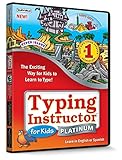
Plan Now to Get your Kids Typing This School Year! They Will Love Learning to Type with Favorite Disney Characters as they learn the keyboard and go on an Adventure with Mickey Mouse & Friends or or on Typer Island with Toby and his feathered side-kick...
Both Typing Adventure are the perfect typing solution for parents, too, as kids will not need help as they are guided step-by-step by the Shop Keeper who travels with them in a crystal ball, or by Toby and Lafette. They help kids progress through the...
Kids learn at their own pace by selecting their own words per minute and skill level. They are taught all of the keys on the keyboard as they type lessons, challenges, tests, and play fun games!
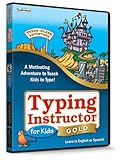
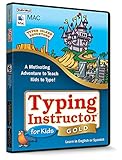
Get your kids typing this summer! Typing Instructor cuts the boredom out of typing and engages kids on an exciting adventure on Typer Island where they complete typing lessons, tests, challenges, and games to capture the castle.
The Ultimate Typing Instructor Adventure for Kids in Full-Screen Size & Rich Color
Island Adventure Theme Motivates Kids to Learn to Type or Improve their Typing Skills
Teaches Keyboard Basics Following one of 11 Age-Appropriate Typing Plans – Meets National, State, & Common Core Standards
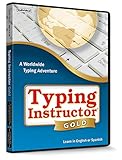
Worldwide Adventure Theme Motivates Typists to Learn to Type or Improve their Typing Skills. Action-packed typing games, lessons, tests, and challenges.
The Ultimate Typing Instructor in Full-Screen Size & Rich Color. Choose from 20 typing plans to begin your adventure.
Rewards every step of the way. Travel through time, countries, or on a safari. Collect stamps in your passport as you complete each destination.
Teaches Keyboard Basics Following one of 20 Typing Plans – Meets National, State, & Common Core Standards
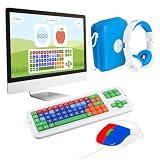
Lowercase Colorful Kids Keyboard: This keyboard showcases lowercase letters in vibrant colors, aiding in early literacy development and making it easier for young learners to associate letters with their corresponding keys, promoting a solid foundation in...
Clevy Kids Mouse: Designed with children in mind, the Clevy Kids Mouse boasts an ergonomic shape and colorful design that fits comfortably in small hands, encouraging natural interaction with digital content and enhancing engagement during learning...
Clevy Kids Headphone: Engineered with safety in mind, these headphones incorporate volume limitation technology to protect children's delicate ears, ensuring a safe and enjoyable listening experience while using educational software or engaging with...
ESSENTIAL KEYS FOR EARLY LEARNING: A simplified layout includes letters A-Z, numbers 0-9, Space, Enter, Shift and Back. The function row and separate number pad are left out, giving children fewer keys to navigate.
FEWER SHORTCUTY KEYS TO NAVIGATE: Without Ctrl, Alt, Esc, Windows, Command, or F-keys, a stray press can't close the learning app, open new windows, or change device settings. Fewer interruptions for kids, and fewer “come fix it!” moments for parents...
BIG KEYS, REAL QWERTY LAYOUT: Oversized keys with large, easy-to-read labels and bright colors help children ages 3–6 see and find letters and numbers. Keys sit in the same QWERTY positions as a grown-up keyboard, not ABC order, so what kids learn now...
EASY WIRED SETUP, USB-A and USB-C: No batteries, charging, Bluetooth pairing, or special software. Both connectors are included for Windows PCs, Macs, Chromebooks, USB-C iPads, and most USB-C tablets and phones that support an external keyboard. Lightning...
Comprehensive Home Schooling Package: The Clevy ABC Maestro Pro Bundle includes everything you need for effective home-based education, featuring a Uppercase Colorful Kids Keyboard, Clevy Kids Mouse, Clevy Kids Headphone, and ABC Maestro Home...
Clevy Keyboard 3 Tri-Mode Uppercase: Connects via USB, Bluetooth, or SimplyWorks wireless, offering smooth compatibility with computers, tablets, and assistive technology setups. designed with lowercase, high-contrast keys to help kids learn typing faster...
Clevy Kids Mouse: Designed with children in mind, the Clevy Kids Mouse boasts an ergonomic shape and colorful design that fits comfortably in small hands, encouraging natural interaction with digital content and enhancing engagement during learning...
Clevy Kids Headphone: Engineered with safety in mind, these headphones incorporate volume limitation technology to protect children's delicate ears, ensuring a safe and enjoyable listening experience while using educational software or engaging with...
Comprehensive Home Schooling Package: The Clevy ABC Maestro Pro Bundle includes everything you need for effective home-based education, featuring a Lowercase Colorful Kids Keyboard, Clevy Kids Mouse, Clevy Kids Headphone, and ABC Maestro Pro...
Clevy Keyboard 3 Tri-Mode Uppercase: Connects via USB, Bluetooth, or SimplyWorks wireless, offering smooth compatibility with computers, tablets, and assistive technology setups. designed with lowercase, high-contrast keys to help kids learn typing faster...
Clevy Kids Mouse: Designed with children in mind, the Clevy Kids Mouse boasts an ergonomic shape and colorful design that fits comfortably in small hands, encouraging natural interaction with digital content and enhancing engagement during learning...
Clevy Kids Headphone: Engineered with safety in mind, these headphones incorporate volume limitation technology to protect children's delicate ears, ensuring a safe and enjoyable listening experience while using educational software or engaging with...
Last update on 2026-11-17 / Affiliate links / Images from Amazon Product Advertising API
How to Choose the Best Keyboard Apps for Kids
Age Appropriateness
When choosing a keyboard app, consider the age and developmental stage of your child. Younger children may benefit from apps with colorful interfaces, large keys, and simple games that introduce basic letter recognition and placement. Older children can handle more complex layouts, speed-building exercises, and educational games that reinforce spelling and grammar.
Educational Content & Engagement
Look for apps that offer a variety of learning activities beyond just typing. Many effective apps incorporate games, stories, or interactive challenges that make learning fun and motivating. Ensure the content is age-appropriate and aligns with educational goals, such as letter identification, phonics, or even basic coding concepts.
User Interface & Customization
A clean, intuitive, and visually appealing interface is essential for keeping children engaged. Consider apps that offer customization options, such as adjustable font sizes, color themes, or sound effects, to personalize the experience. Easy navigation and clear instructions will help children use the app independently and build confidence.
Frequently Asked Questions
Are these apps suitable for children who have never used a computer before?
Yes, many keyboard apps are designed specifically for beginners. They often start with basic letter recognition and gradually introduce typing and keyboard layout concepts in a fun, game-like manner.
Can these apps help improve my child's typing speed and accuracy?
Absolutely. Most apps include progressive lessons and challenges that focus on improving both speed and accuracy. Gamified elements often encourage practice, leading to noticeable improvements over time.
What age range do these keyboard apps typically cater to?
The age range can vary widely, with some apps designed for preschoolers just learning letters, while others are suitable for older children and even teens looking to enhance their typing skills for school or future careers.
Do I need a special keyboard for these apps?
Generally, no special keyboard is required. These apps are designed to work with standard keyboards on tablets, computers, or even smartphones. Some apps might offer on-screen keyboards for touch devices.
As an Amazon Associate, we earn from qualifying purchases. Product prices and availability are accurate as of the date/time indicated and are subject to change.
Amazon pricing is not included in price tracking/graph. We do not issue alerts for any products through Amazon.