LED Segment Displays are fundamental components for numerical and simple alphanumeric readouts in electronics projects, industrial equipment, and consumer devices. They provide clear visual feedback, commonly seen in clocks, counters, and measuring instruments. Products were evaluated based on ease of integration, display clarity, connectivity requirements, user reviews, and feature analysis.
EC Digital Orange 0.54 Inch 4-Digit LED Segment Display for Arduino
$12.99
This module stands out with its 14-segment alphanumeric capability and integrated I2C constant-current matrix controller, significantly simplifying wiring and programming for complex displays.
Search on AmazonWWZMDiB 20 Pcs 1 Bit 7 Segment Display 10 Pin Red 0.56" Common Cathode LED Number Digital Tube
$8.99
Offering 20 individual 1-bit, 7-segment common cathode displays, this pack provides excellent value for projects requiring multiple basic numerical indicators without integrated drivers.
Search on Amazondiymore M1637 5 Packs Red/Green/White/Yellow/Blue Colors TM1637 0.56" LED Display Digital Tube 7 Segment 4 Digit Clock Double Displays Dots Module Serial Driver Board(5 Colors)
$14.99
The diymore M1637 pack includes 5 modules with TM1637 drivers and multiple color options, offering versatile and simplified control with only two signal lines.
Search on Amazon
- 4-Digit Digital Tube Display Module: The Driver Ic Is Tm1637, Only Two Signal Lines Can Make Mcu Control Four Digit 8-Segment Led. Can Be Used To Display Decimal, Letters And So On
- Working Voltage:3.3V/5V DC
- Working Current:30 / 80MA
- Color: red highlights

- 【12-PACK MULTI-COLOR LED BAR GRAPH SET】Includes 12 ten-segment LED bar displays in 6 colors (2× Red, 2× Yellow, 2× White, 2× Green, 2× Blue, 2× Multicolor) for visual indicators and color-coded project feedback.
- 【BUILT-IN RESISTOR PCB BOARDS】Includes 12 current-limiting resistor array boards — no need for 10 separate resistors per LED bar. Plug the LED bar graph into the PCB and insert into your breadboard, reducing wiring and errors.
- 【3D-PRINTED ENCLOSURES INCLUDED】12 3D-printed protective cases snap onto each LED bar graph for a finished look while protecting the LEDs from dust and damage.
- 【BREADBOARD COMPATIBLE】Standard 2.54mm pin spacing — drop-in ready for breadboards, Raspberry Pi, ESP32, and other microcontrollers. Suitable for beginners and advanced makers.

- This version of the LED backpack is designed for two dual 14-segment "Alphanumeric" displays. These 14-segment displays normally require 18 pins (4 'characters' and 14 total segments each)
- This module solves the annoyance of using 18 pins or a bunch of chips by having an I2C constant-current matrix controller sit neatly on the back of the PCB
- The controller chip takes care of everything, drawing all the LEDs in the background. All you have to do is write data to it using the 2-pin I2C interface
- There are three address select pins so you can select one of 8 addresses to control up to 8 of these on a single 2-pin I2C bus (as well as whatever other I2C chips or sensors you like)

- 10PCS LED Display 10 Segment Bargraph Light Display Module Bar Graph Ultra Bright Red Yellow Green Blue Colors Multi-color
- 10-Segment LED BAR Graph Indicator DIP,1*Blue 4*Green 3*Yellow 2*Red
- Pin spacing: 2.54mm,Number of pins: 20
- Forward voltage: 2.5V for red LED, 2.0V for yellow, 2.8V for green, 3.0V for blue

- Product Name : LED Digital Tube;Model : LD-5161;Type : Common Cathode
- Emitted Color : Red;Pin Number : 10;Pin Pitch : 2.54mm/0.1"
- Size(No INclude Pin) : 19 x 13 x 7mm/0.7" x 0.5" x 0.3" (L*W*H);Digital Tube Height : 14.2mm/0.56"
- Material : Plastic, Metal;Color : Black, White

- 【SIX COLOR OPTIONS】Includes one each of Yellow, Green, Blue, White, Orange, and Red 0.56" 4-digit 7-segment displays with decimal points (each display is a single color) — for color-coded projects or design matching.
- 【EASY TM1637 INTEGRATION】Requires only 2 GPIO pins (DIO for Data, CLK for Clock). Compatible with ESP32, Raspberry Pi, and more — simple libraries for quick setup.
- 【CHAINABLE DESIGN】Share the CLK line across multiple displays while using individual DIO lines — suitable for multi-digit clocks, counters, or data dashboards.
- 【ACCESSORIES INCLUDED】Each display includes a transparent black film cover to reduce glare and improve contrast, plus a 3D-printed enclosure for a finished look.

- 【Massive 4" Jumbo Size Visibility】 Extra-large 100mm+ character height for easy reading from afar – ideal for scoreboards, large clocks, timers, counters, temperature displays, or event signage
- 【Integrated Driver PCB Simplifies 12V Drive】 Custom back board handles high-voltage 12V segments while accepting 3.3V or 5V MCU logic – just connect power (12V + 5V/3.3V) and send serial data
- 【Chainable Click-On Design】Modules snap together effortlessly – daisy-chain multiple units using only 3 GPIO pins (data, clock, latch) for multi-digit displays without extra wiring hassle
- 【Plug-and-Play Convenience】No complex transistor arrays or high-current drivers needed – perfect for ESP32-S3, Raspberry Pi Pico, STM32, and other microcontrollers

- For use library: TM1637.h.
- Digital tube 8 grey level is adjustable.
- Module connects to digital I/O on 2 pins.
- The control interface electrical level is 5V.

- Only three IO ports are used to drive the eight digit display. MAX7219 supports flicker free displays as well as cascading displays.
- MAX7219 is an integrated serial input / output common-cathode display driver, which connects your microprocessor to a 7-segment digital LED display with 8 digits.
- This module is compatible with 5V and 3.3V microcontrollers.
- VCC and GND should not be connected reversed, so as not to burn the chip

- 2pcs MAX7219 Led Module 8-Digit Digital LED Display 7 Segment Display Tube For arduino MCU Raspberry Pi 51/AVR/STM32
- MAX7219 digital display control module
- This module is compatible with 5V and 3.3V microcontrollers.
- MAX7219 is an integrated serial input / output common-cathode display driver, which connects your microprocessor to a 7-segment digital LED display with 8 digits. Only three IO ports are used to drive the eight digit display.
This article is part of our complete guide Lighting — browse all our comparisons and buying guides.
Last update on 2026-10-16 / Affiliate links / Images from Amazon Product Advertising API
How to Choose the Best LED Segment Displays
Driver Integration and Complexity
The primary distinction among LED segment displays often lies in whether they include an integrated driver IC. Modules like the WWZMDiB 4 Digit 7 Segment Digital Tube LED Display Board (with its TM1637 driver) or the diymore M1637 modules greatly reduce the complexity of your project by handling segment control internally. In practice, this means fewer microcontroller pins are required—often just two signal lines for data and clock. Conversely, basic 1-bit displays, such as the uxcell 10 Pcs Common Cathode or the WWZMDiB 20 Pcs 1 Bit 7 Segment Display, require direct connection to a microcontroller or an external driver circuit for each segment, demanding more I/O pins and increased circuit complexity.
Display Type and Versatility
LED segment displays come in various types, most commonly 7-segment for numbers and basic punctuation, or 14-segment (alphanumeric) for letters and more complex symbols. The EC Digital Orange 0.54 Inch 4-Digit LED Segment Display, for instance, utilizes 14-segment displays, which are significantly more versatile for displaying text beyond simple digits. When choosing, consider the range of characters your application requires. For simple numerical readouts like clocks or counters, a standard 7-segment display is typically sufficient and more cost-effective. However, for applications requiring messages or mixed alphanumeric output, the enhanced capability of a 14-segment display becomes essential.
Connectivity and Pin Requirements
The method of connecting the display to your microcontroller is a critical factor. Displays with integrated drivers, like those featuring the TM1637 chip from WWZMDiB or diymore, typically use a serial interface (often a custom 2-wire protocol) which minimizes pin count. The EC Digital alphanumeric display utilizes an I2C interface, which is a common and robust serial communication protocol, allowing multiple devices to share the same two signal lines. In contrast, individual 7-segment displays, such as those from uxcell, are direct-drive components, often requiring 8-10 pins per digit, including common pins. Evaluating the available I/O on your chosen microcontroller and the overall complexity of your circuit will guide this decision.
Quantity and Project Scale
The number of displays needed for a project can heavily influence the purchasing decision. For single-digit indicators or small-scale prototyping, purchasing individual 1-bit displays might suffice. However, for projects requiring multiple digits or a high volume of displays, packs like the WWZMDiB 20 Pcs 1 Bit 7 Segment Display offer better value per unit. For multi-digit displays with integrated drivers, the diymore M1637 5 Packs provides a convenient solution for multiple projects or prototyping different color schemes without the need for extensive individual wiring.
Pros & Cons
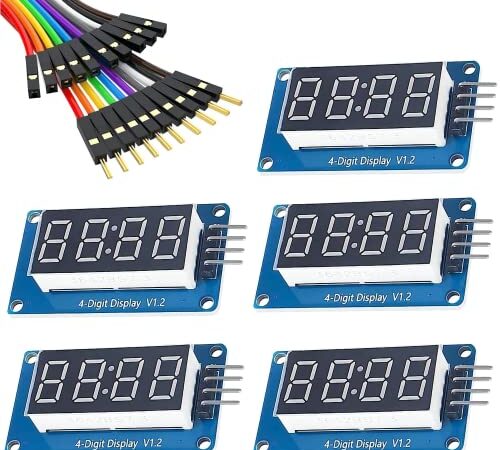
WWZMDiB 4 Digit 7 Segment Digital Tube LED Display Board for Arduino (5 Pcs)
Pros
- Integrated TM1637 driver simplifies control, requiring only two signal lines.
- Compatible with both 3.3V and 5V DC systems, offering broad microcontroller support.
- Four-digit display module is ready-to-use for numerical readouts.
Cons
- Fixed to 7-segment numerical display, limiting alphanumeric capabilities.
- Working current can be up to 80mA, which might be a consideration for low-power projects.
diymore M1637 5 Packs Red/Green/White/Yellow/Blue Colors TM1637 0.56" LED Display Digital Tube 7 Segment 4 Digit Clock Double Displays Dots Module Serial Driver Board(5 Colors)
Pros
- Includes five modules with different color options (Red/Green/White/Yellow/Blue) for versatility.
- Features the TM1637 driver, reducing pin count and simplifying programming with a dedicated library.
- Offers 8 levels of adjustable grey level, allowing for brightness control.
Cons
- Limited to 7-segment numerical display, not suitable for full alphanumeric text.
- Requires familiarity with the TM1637 library for effective use, which may be a learning curve for beginners.
EC Digital Orange 0.54 Inch 4-Digit LED Segment Display for Arduino
Pros
- Features 14-segment alphanumeric displays, capable of showing letters and more symbols.
- Integrates an I2C constant-current matrix controller, significantly reducing wiring (2 pins) and microcontroller load.
- The controller chip handles background drawing, simplifying data writing for the user.
Cons
- Alphanumeric displays are typically more complex to program compared to basic 7-segment units.
- The I2C interface, while efficient, requires specific library support and address management.
Common Mistakes to Avoid
Overlooking Driver Integration
A common pitfall is failing to distinguish between raw segment displays and those with integrated drivers. Products like the WWZMDiB 4 Digit 7 Segment Digital Tube LED Display Board (TM1637) or the diymore M1637 modules simplify wiring to just two signal lines. In contrast, a basic uxcell 10 Pcs Common Cathode 1-bit display requires direct control of each segment pin, often leading to a complex wiring harness and high pin count on the microcontroller.
Ignoring Display Type (7-segment vs. 14-segment)
Users sometimes mistakenly purchase a 7-segment display when their project requires alphanumeric capabilities. The EC Digital Orange 0.54 Inch 4-Digit LED Segment Display explicitly states it's designed for 14-segment alphanumeric displays. Attempting to display letters beyond basic 'A', 'b', 'C', 'd', 'E', 'F' on a standard 7-segment unit will result in illegible characters.
Mismatching Common Cathode/Anode Types
Another frequent error is not checking the display's common type. Both the uxcell 10 Pcs Common Cathode and WWZMDiB 20 Pcs 1 Bit 7 Segment Display specify 'Common Cathode'. Using a common anode display with common cathode driving logic (or vice-versa) will result in the segments either not lighting up or always being on, requiring a complete reversal of wiring or code logic.
Voltage Incompatibility
Neglecting to verify the working voltage can damage displays or microcontrollers. While many modules, such as the WWZMDiB 4 Digit 7 Segment Digital Tube LED Display Board, support both 3.3V and 5V, others might be specific. Supplying a 5V display with 3.3V might result in dim output, while applying 5V to a strictly 3.3V component could lead to component failure.